

Picture of coin
Taking a picture of the coin is a very important skill, especially if you would be using the picture to sell the coin online. Picture is a huge part of marketing in online auctions and it's known fact that auctions with better pictures would bring the best results. Here are some pointers on how to take a good picture of the coin:
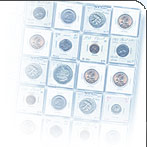
Picture of the coin
Scanner VS Digital Camera
- Although scanning coins are faster, it's probably the only reason why you would choose a scanner over digital camera for taking coin pictures.
-
Pictures of the coins taken with digital Camera show details of the coin much better than the scanned coins see example below:
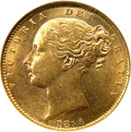
Coin Photo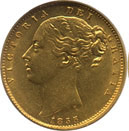
Coin Scan - Conclusion: Digital camera is a better choice for taking coin pictures, especially for coins with ramaining mint lustre.
Taking coin pictures with digital camera
- Fix your camera with a tripod and use macro mode or macro lense to take coin pictures
- Don't even try to use internal flash of the camera, it will reflect from coin surface and you will never get a good coin photo
- Use LCD monitor when taking coin pictures, you
will be able to preview depth of field
- Cross-lit the coin to bring out details
- Switch to aperture priority mode and select a small aperture such as f/8 (F8) this will increase depth of field and show details of the coin better.
(NOTE: Remember smaller the aperture bigger the F number)
- Use Adobe Photoshop or any other image editing software to resize these photos. You can do it very fast with free Image Resizer by Microsoft.


